PHP Pastebin script with Admin panel
Advanced Open PHP Pastebin script with Admin panel and customisation options
Make Someone's Day
Make someone's day by sharing this incredible item with them!
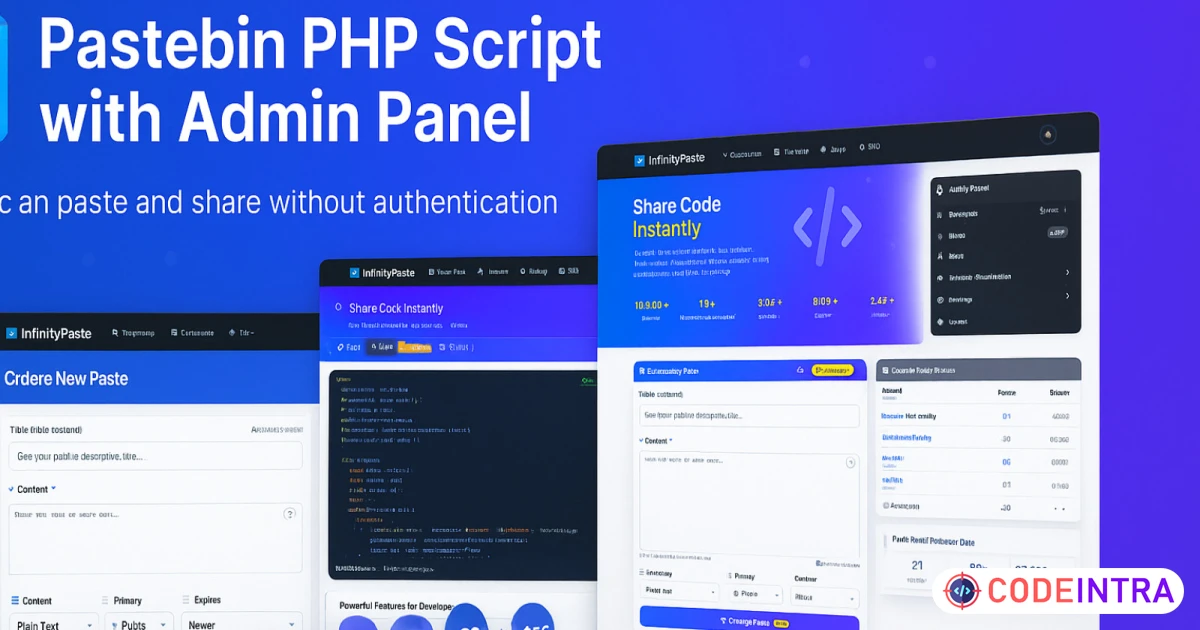
InfinityPaste is a powerful, modern, and user-friendly pastebin platform that allows users to share code snippets, text, and documents effortlessly without requiring registration or login. Built with PHP and Bootstrap, it offers a clean, responsive interface with both light and dark themes.
Whether you're a developer sharing code snippets, a student collaborating on projects, or a professional sharing documentation, InfinityPaste provides the perfect platform for quick and secure text sharing. The platform is designed for simplicity while maintaining powerful administrative features for site management.
🚀 Why Choose InfinityPaste?
Fast, secure, and completely customizable pastebin solution that's ready to deploy in minutes!
⚡ Installation Time: Less than 5 Minutes!
Our streamlined installer makes deployment incredibly fast and error-free.
🎯 Perfect For
👨💻 Developers
Share code snippets, debug logs, and collaborate on projects with team members.
🏢 Businesses
Internal document sharing, temporary file hosting, and team collaboration tool.
🎓 Educational Institutions
Student-teacher code sharing, assignment submissions, and academic collaboration.
💰 Entrepreneurs
Start your own pastebin service with built-in monetization features and SEO optimization.
📦 What's Included
- ✅ Documentation and setup guide
- ✅ Mobile-responsive design
- ✅ Regular updates and improvements
🌟 Live Demo Available
Check out our live demo to see InfinityPaste in action before making your purchase!
🚀 Get Started Today!
Join thousands of satisfied customers who have chosen InfinityPaste for their pastebin needs. Professional, reliable, and easy to use!
Features
🔓 No Registration Required
Users can create and share pastes instantly without the hassle of creating accounts or logging in.
🎨 Dual Theme Support
Beautiful light and dark themes built with Bootstrap for optimal user experience across all devices.
📋 Comprehensive Paste Management
Share, view raw content, download, and duplicate pastes with intuitive one-click actions.
⚙️ Powerful Admin Panel
Complete control over site settings, titles, meta tags, and content management from a single dashboard.
🔍 SEO Optimized
Built-in sitemap system and meta tag management for better search engine visibility.
💼 Monetization Ready
Integrated ad code management system to help you monetize your pastebin platform.
🛠️ Custom Code Injection
Add custom CSS and JavaScript through the admin panel for advanced customizations.
📄 Content Management
Create, edit, view, and delete pages with a user-friendly content management system.
❓ Help & FAQ System
Built-in features and FAQ sections to help users understand your platform better.
📱 Fully Responsive
Works perfectly on desktop, tablet, and mobile devices with responsive Bootstrap design.
🚀 Easy Installation
Comes with a built-in installer for quick and hassle-free setup process.
🔒 Secure & Clean
Built with security best practices and clean, well-documented code structure.
Requirements
📋 System Requirements
Server Requirements
- ✓ PHP 8.0.2 or higher
- ✓ MySQL 5.7+ or MariaDB 10.2+
- ✓ Apache or Nginx web server
- ✓ mod_rewrite enabled (for clean URLs)
- ✓ PHP Extensions: PDO, PDO_MySQL, mbstring, openssl
- ✓ Minimum 50MB disk space
- ✓ SSL certificate recommended
Instructions
🛠️ Installation Instructions
Getting InfinityPaste up and running is incredibly simple thanks to our built-in installer. Follow these easy steps:
1
Download & Extract
Download the InfinityPaste package and extract all files to your web server directory (public_html, www, or your preferred location).
2
Set File Permissions
Ensure your web server has write permissions to the installation directory. Set permissions to 755 for directories and 644 for files.
3
Create Database
Create a new MySQL database and user through your hosting control panel (cPanel, Plesk, etc.) or phpMyAdmin.
4
Run the Installer
Navigate to yourdomain.com/install in your web browser. The built-in installer will guide you through the setup process.
5
Configure Database
Enter your database credentials (host, database name, username, password) in the installer form.
6
Set Admin Credentials
Create your administrator username and password for accessing the admin panel.
7
Complete Installation
Click "Install" and wait for the process to complete. The installer will create all necessary database tables and configurations.
8
Access Your Site
Once installation is complete, you can access your pastebin at your domain and the admin panel at yourdomain.com/admin.



Comments (0)
Item Details

| Price |
$23
|
| Views |
1.7 K
|
| Version |
9 August 2025
|
| Last Update |
05-Oct-2025
|
| Release Date |
05-Oct-2025
|
| Category | |
Order Confirmation
Please confirm your order. Once you confirm, the total amount will be deducted from your wallet, and the order will be placed. If you wish to make any changes, you can edit your order before pay.
By confirming, you also agree to our refund policy. Please make sure you've read and understood the terms.
Note: Coupon is applicable for items above $50