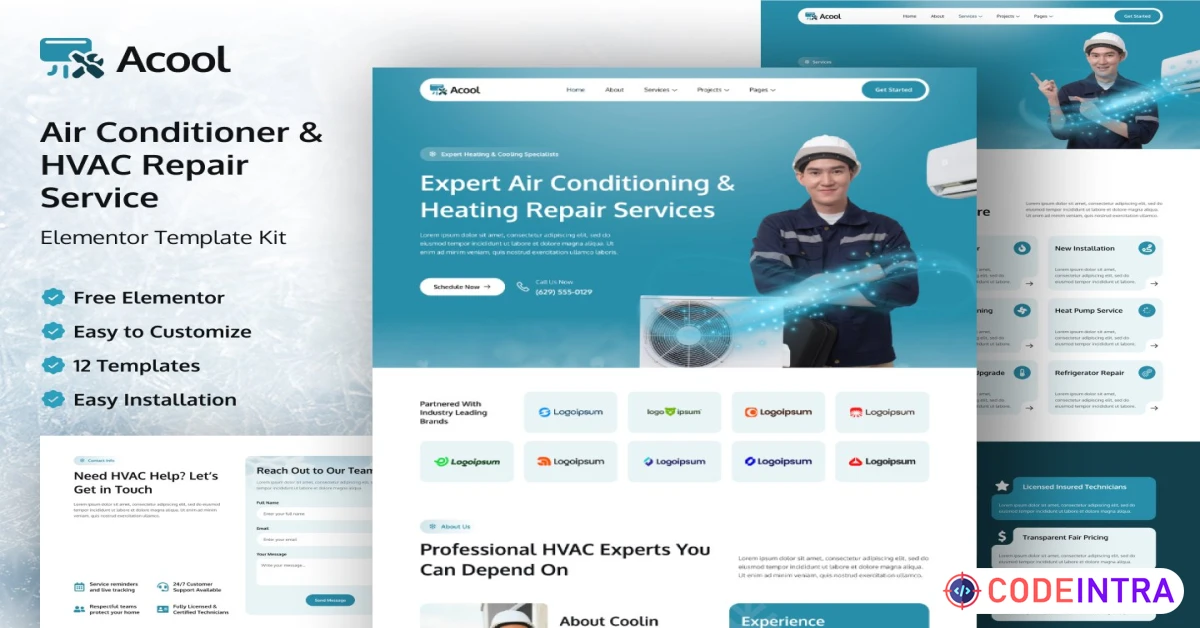
Acool – Air Conditioner & HVAC Repair Service Elementor Template Kit
Get Acool – Air Conditioner & HVAC Repair Service Elementor Template Kitthat includes ac & air conditioner, from our library of WordPress Template Kits. Get unlimited downloads with an Envato subscription!
Make Someone's Day
Make someone's day by sharing this incredible item with them!
Acool – Air Conditioning & HVAC Service Elementor Template Kit
Acool is a modern and professional Elementor Template Kit created specifically for air conditioning, HVAC repair, cooling services, ventilation, and maintenance companies. Designed with a clean layout and a calming cool teal color palette, Acool helps service businesses build trust, highlight expertise, and convert visitors into customers.
This template kit is ideal for both residential and commercial HVAC service providers, featuring dedicated sections for licensed certifications, transparent pricing plans, project showcases, and emergency 24/7 support messaging.
Every layout is carefully crafted to emphasize reliability, professionalism, and customer confidence.
Acool is fully responsive and mobile-friendly, ensuring your website looks great on desktops, tablets, and smartphones. Built exclusively for Elementor, it allows you to create and customize pages visually—without writing a single line of code.
Note: This is not a WordPress theme. Acool is an Elementor Template Kit that works with most WordPress themes.
Key Features
- Clean, professional HVAC-focused design
- Built specifically for air conditioning & repair services
- Fully responsive & mobile optimized
- Elementor drag-and-drop editing
- No coding required
- Optimized layouts for service businesses
- Fast setup with reusable templates
- Easy customization for colors, text, and branding
Included Templates
- Homepage
- About Us
- Services
- Service Detail
- Projects
- Project Detail
- Pricing
- FAQ
- Blog
- Single Post
- Contact Us
- Error 404
Required Plugins (Installed Automatically with Kit)
- Elementor
- Envato Elements
- Ultimate Addons for Elementor Lite
- MetForm – Custom Form Builder for Elementor
- Gum Addon for Elementor
- Jeg Elementor Kit
Installation & Usage Instructions
How to Use Template Kits
This template kit contains Elementor design data only and must be installed using the Envato Template Kit Import plugin or directly through Elementor.
Step-by-Step Installation
- Install and activate Elementor and Envato Elements plugins
- Go to Envato Elements > Template Kits
- Upload the Acool template kit ZIP file
- Import all templates (pages, headers, forms)
- Create new pages in WordPress
- Edit pages with Elementor
- Insert templates from My Templates
📘 Official installation guide:
https://help.market.envato.com/hc/en-us/articles/36033428836889-How-to-Upload-Install-Elementor-Template-Kits-from-Themeforest-to-WordPress
Header & Footer Setup (Jeg Elementor Kit)
If you are not using Elementor Pro, follow these steps:
- Go to Jeg Elementor Kit > Header Template
- Click Add New Header
- Add condition → All Site → Create
- Click the pencil icon to edit
- Click the gray folder icon
- Open My Templates tab
- Insert the header template
- Customize and Save
⚠️ Make sure each page’s layout is set to Elementor Full Width so headers and footers display correctly.
MetForm Custom Form Import Instructions
- Edit the page where the form should appear
- Open Elementor Navigator and select the MetForm widget
- Click Edit Form
- Select New, leave it blank, then click Edit Form
- Click the Add Template (gray folder) button
- Open My Templates tab
- Insert the imported MetForm template
- Click Update to save changes
Images & Assets
This Template Kit uses demo images from Envato Elements.
- You must license these images from Envato Elements to use them on your live website
- Alternatively, you can replace them with your own images

Comments (0)
Item Details

| Price |
$39
|
| Views |
22
|
| Version |
57-Y
|
| Last Update |
05-Feb-2026
|
| Release Date |
05-Feb-2026
|
| Category | |
Order Confirmation
Please confirm your order. Once you confirm, the total amount will be deducted from your wallet, and the order will be placed. If you wish to make any changes, you can edit your order before pay.
By confirming, you also agree to our refund policy. Please make sure you've read and understood the terms.
Note: Coupon is applicable for items above $50